
Brave Place Search API: The Google Maps Alternative That Costs 6–7x Less
Today we’re releasing the improved Brave Place Search API. It’s a single endpoint for finding places in the physical world (such as businesses, landmarks, and points of interest) drawn from our index containing about 200 million points of interest worldwide, and growing.
This API is the backbone of place search in Brave Search, which handles over 2.2 billion queries a month and powers the Brave Search map. The improved version is available today for public access through the Brave Search API, on the Search plan, at a flat $5 per 1,000 requests.
Two things make the Place Search API worth your attention. First, the quality is comparable to Google Maps, as you will see on the experiment below (which tested a side-by-side comparison of Brave’s Place Search endpoint with 1,000 real queries). Second, Brave’s Place Search API is available at a fraction of the cost of the Google Maps API (which starts at $32 to $35 per 1,000 requests). This makes Brave 6 to 7 times more affordable for comparable place search.
This post details what the API returns, where it’s useful, how it measures up to Google Maps, and why building on Brave’s independent search stack matters.
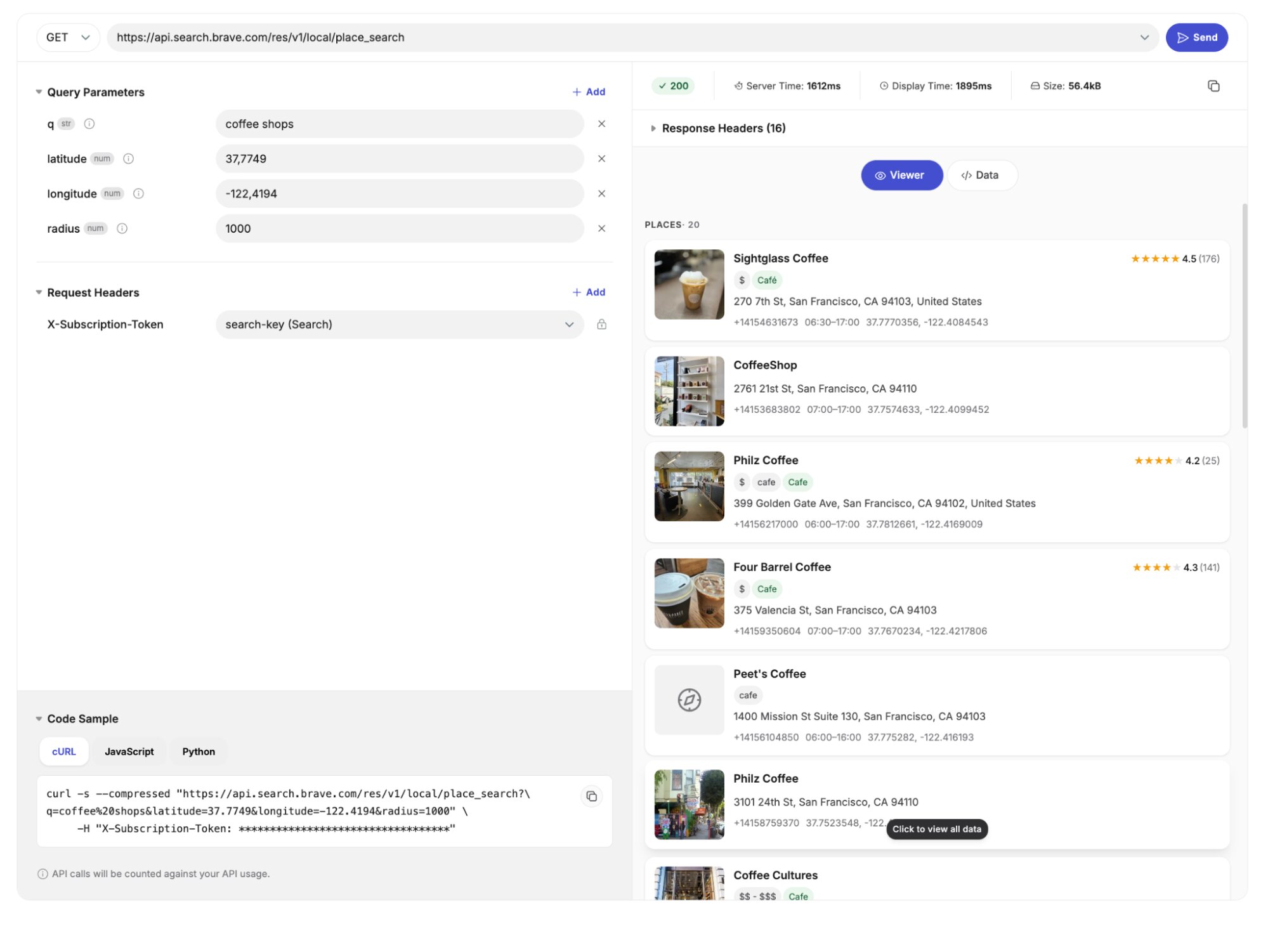
What it does
One endpoint, accessing an index of about 200 million points of interest worldwide, as well as cities, countries, regions, and streets. This is the backbone of place search in Brave Search, which handles and powers the Brave Search map.
Send a query and a place to look:
curl "https://api.search.brave.com/res/v1/local/place_search?latitude=37.7749&longitude=-122.4194&q=coffee+shops&radius=1000"
  -H "X-Subscription-Token: <YOUR_API_KEY>"
No coordinates? Use a name instead, such as location=tokyo japan. Drop the query entirely and you get Explore mode: a snapshot of what’s around a point, ideal for map views. It even works without any location hints at all, doing a global search instead.
Every result comes back ready to render:
- Name, URL, coordinates, and full postal address
- Ratings, review counts, price range, categories, and cuisine
- Opening hours (including today), phone, email, and timezone
- Photos and distance from your search center
All these attributes are available on a flat rate of $5 per thousand requests. Compare that with Google, which charges you more for additional attributes.
Need deeper data? Every result carries an id. Pass it to /local/pois for more detail or /local/descriptions for AI-written summaries. The best part: those IDs also come from Web Search results, so one integration covers your local and Web surfaces at once.
Useful in multiple ways for apps and agents
You know your product better than we do. So we won’t tell you what to build. But the data is rich enough that one call covers jobs you’d otherwise wire up several APIs to handle:
- “Near me” discovery: restaurants, gyms, EV chargers, ATMs. Anchor to coordinates, set a radius, render a ranked list.
- Travel guides: explore mode plus the
citiespanel shows what’s worth seeing, then drills into hotels and attractions. - Business directories: try “find a location near you” functionality without licensing a maps stack.
- Map dashboards:
zoom_levelhints and coordinates drop straight into your tiles. - Geofenced nudges: try searches like “three highly-rated lunch spots within 500m.”
- AI agents: structured, current place data a model can reason over.
The point is the breadth. Where you take it is up to you.
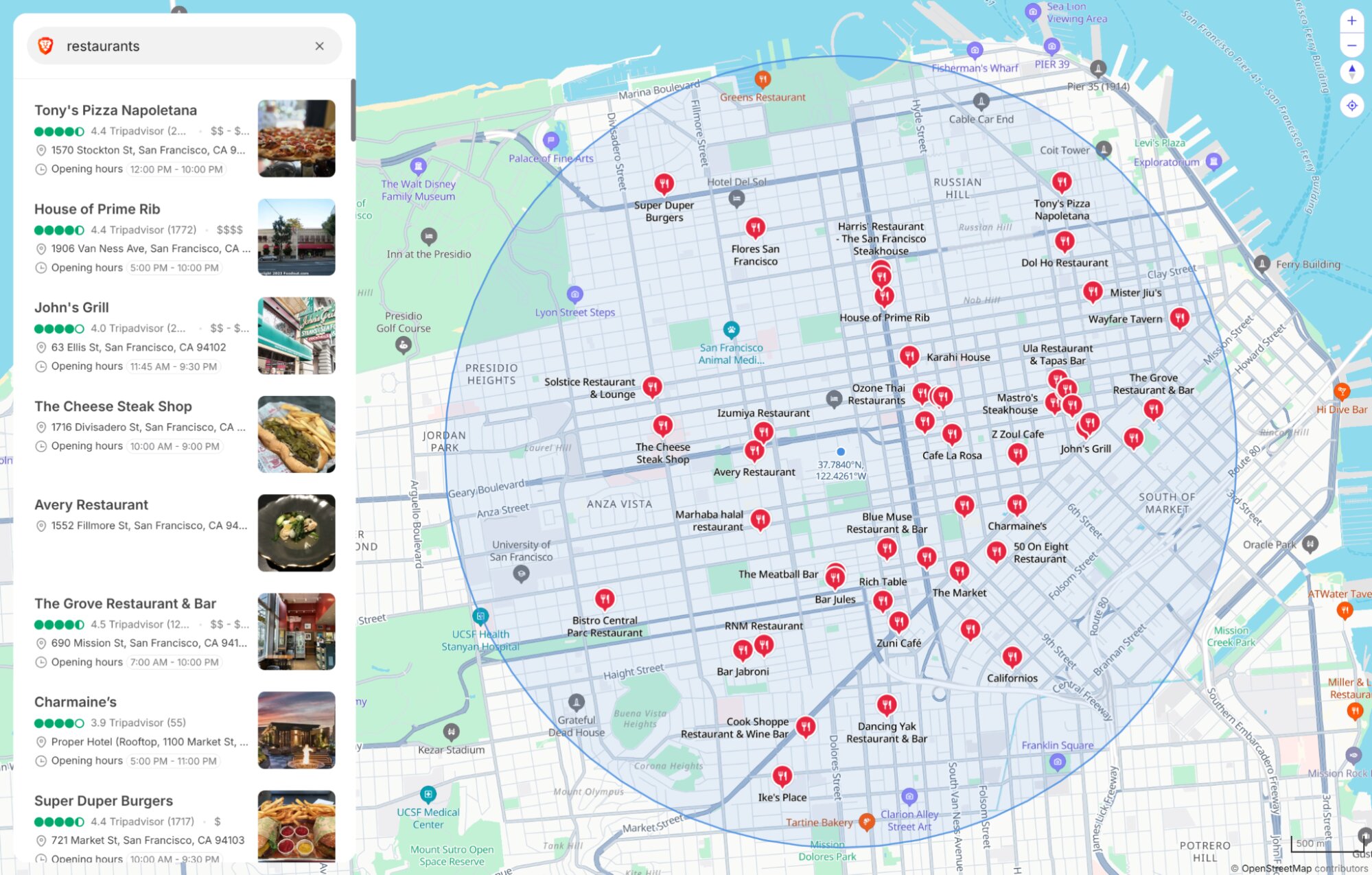
Note the radius parameter will bias toward an area rather than hard-cutting at the edge. Under ~20 km it gives tight “near me” results. For a famous landmark, go wide or skip it. Match it to the job and results stay clean.
How it compares to Google Maps
Google Maps is the more mature product, and we won’t claim otherwise.
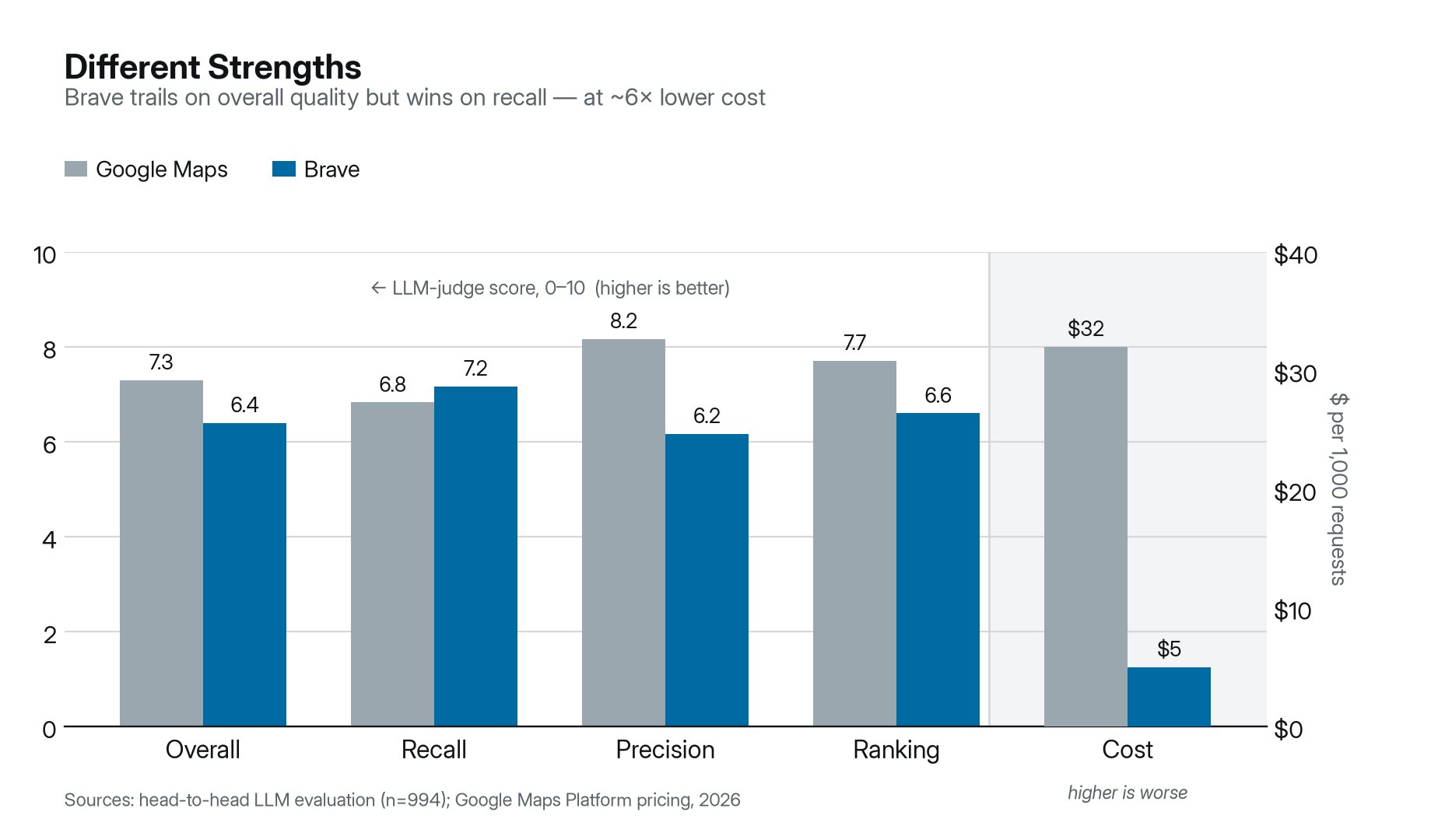
But the question that matters is whether Brave is good enough to build on, and what you gain by choosing it. To answer it, we ran 1,000 real, global, and multilingual place queries through both Brave and Google Maps. An LLM judge scored every pairing on recall, precision, ranking, and overall quality.
The result: a close second in overall quality: 6.4 vs 7.3 out of 10.
The two engines aren’t tied in character, though. They win in opposite places. That’s the useful part.
Where Brave wins:
- Coverage: Brave returns more of the places that actually exist (recall 7.2 vs 6.8). Google often returns fewer.
- Ambiguous names: Search
"africa"near Johannesburg. Brave returns local businesses named “Africa” a kilometer away. Google returns the continent, 2,000 km out. Brave won this query type on recall 8.0 vs 6.1. - Streets and addresses: For queries like
"waka sakai line", Google’s place API often returns one far-away result or nothing. Brave returns the right nearby ones.
For the long tail of real local queries (e.g. names, addresses, streets, or anything fuzzy) — Brave is more likely to hand back something useful and close.
Where Brave trails:
- Category ranking: For “kebab near me,” Google floats closer results to the top more reliably.
- Fuzziness: Broader coverage drags in off-topic results sometimes (precision 6.2 vs 8.2).
So who should switch?
If you live in the long tail of names, addresses, and streets, or you value coverage, Brave is a strong fit today. If your traffic is mostly clean category search where precision is everything, Google’s Place Search API has an edge, but that edge is small. Try it on your queries.
Considering the price of the Brave Search API, it’s also worth exploring combining Brave and Google options to create an ensemble.
Caveats of the evaluation: The judge of the Brave-vs-Google Place Search API evaluation was an LLM (Opus4.8) which is extremely competent but not free of quirks. For instance, we have seen a bias towards length of the listings, where the judge rewards verbosity even if explicitly instructed not to. Another important caveat not captured by the judge is data-staleness. In that regard, Google has an edge that is hard to beat, as many business owners update changes on opening hours, phone numbers, etc. on the Google Business Profile before they do it on the Web itself. We get the data out of our Web crawler and Web Discovery Project (WDP) signals, which are by definition more limited than the direct input business owners give to Google.
The price difference, in full
Brave is a flat $5 per 1,000 requests, with every field included. And each plan includes $5 in free credit every month.
Google charges per SKU. The endpoints you’d use sit at the top of its price table.
| Brave Place Search | Google Text / Nearby Search (Pro) | |
|---|---|---|
| Per 1,000 (entry) | $5.00 | $32.00 (Enterprise: $35.00) |
| Pricing model | Flat, all fields included | Tiered by SKU and field mask |
| Free allowance | $5/month | Capped per SKU. Universal $200 credit removed |
At the entry tier, Brave is 6 to 7 times cheaper. And that’s before Google’s field-mask tiers push you higher. With Brave, ratings, hours, and photos all ride the same call.
(Google figures are from its official pricing table, 2026. Volume discounts exist for both.)
Built on an independent index
Most search APIs scrape their data from Google. That carries real risk for anyone shipping to customers.
Scraping violates Terms of Service. Google has litigated against providers over it. A scraped feed can be throttled or shut off, and it can’t offer true Zero Data Retention.
Brave is built differently. It runs one of only three independent, global-scale search indexes in the Western world, and the only one outside Big Tech. We own and operate the entire stack, Place Search included. That means:
- No scraper risk: Your product does not depend on a service that unofficially scrapes Google, which is subjected to unpredictable quality of service and risk of total discontinuation.
- Zero Data Retention: Queries aren’t stored, logged, or tied to identities.
- No conflict of interest: We don’t train our models on your queries.
- SOC 2 (Type II) attestation: Easier legal and security review.
- One platform, one set of IDs: Place Search, Web Search, POI details, and AI descriptions share IDs and the same $5/1k plan.
If you’re building with AI
Frontier models are becoming a commodity. The context you feed them is now what sets your application apart.
Our own research proves it. Ask Brave runs an open-weights model (Qwen) on Brave’s LLM Context API. It goes head-to-head with ChatGPT, Perplexity, and Google AI Mode (and wins) on the strength of better grounding data alone.
Place Search is the local half of that story. An agent that recommends a restaurant or answers “what’s open near me” needs structured, current place data. This endpoint returns exactly that, on the same Search plan as the LLM Context API. Web knowledge and world knowledge, one subscription.
To move faster, the API ships with Skills for Cursor, OpenCode, and Claude Code, plus an API Assistant in the portal that points you to the right endpoint and code.
Start now
curl "https://api.search.brave.com/res/v1/local/place_search?location=paris+france&q=museums&country=FR"
  -H "X-Subscription-Token: <YOUR_API_KEY>"
Place Search is live on the Search plan. $5 per 1,000 requests. $5 in free credit every month. Enough to build something real today.
- Subscribe and get a key
- Read the API reference
- Load the Brave Search API Skills into your AI editor
Pricing sources:

