
How to add Brave Search to Claude Desktop with MCP
This guide explains how to integrate Claude Cowork on Amazon Bedrock and the Brave Search MCP Server.
Every team faces the same challenge: the information they need to make decisions is scattered across the web, locked in documents, and constantly changing.
Finding information is only part of the problem. Teams also need to ground AI-generated insights in real-time, sourced data while maintaining enterprise security and compliance.
In this post, we dive deep into how we can leverage Claude Cowork on Amazon Bedrock and the Brave Search MCP Server to work together to address this challenge.
We will walk through configuring the Cowork desktop application with Bedrock, and how to add Brave Search as the local MCP server for interactive, user-driven workflows.
Expanding AI adoption across the organization
Claude Cowork is Anthropic’s agentic AI desktop application. It lets users delegate research, document analysis, data processing, and report generation to Claude. With Cowork on third-party (3P) mode, organizations route all model inference through Amazon Bedrock in their own AWS account. Prompts, responses, files, and tool outputs never leave the customer’s cloud environment.
Organizations across every industry already build with Claude Code in Amazon Bedrock to boost developer productivity and accelerate delivery. With Amazon Bedrock, you build within your existing AWS environment, maintain enterprise security and regional data residency, and scale inference. Your data stays under your account’s controls: Amazon Bedrock does not store prompts, files, tool inputs or outputs, or model responses, and none of this data is used to train foundation models.
Claude Cowork in Amazon Bedrock extends this same trust model to every team in your organization.
What stays the same in Cowork 3P mode
- Long-running tasks: Multi-step research, agentic coding, and complex workflows
- Full Cowork UI: Projects, artifacts, memory, file upload and export, remote connectors, skills, and plugins
- MCP server support: Connect to external data sources and tools your organization approves
- Sandboxed execution: Shell commands run in a hardened VM, and file access is scoped to allowed folders
What changes
- No Anthropic account login required: Authentication flows through IAM or Amazon Bedrock API keys
- No conversation data flows to Anthropic: Prompts, responses, files, and tool outputs go only to your configured Amazon Bedrock endpoint and are stored only on the local machine
- Billing through your AWS account: Consumption-based pricing with no seat licensing from Anthropic
- Centrally managed: All configuration is delivered through your existing MDM (Jamf, Intune, Workspace ONE, or Group Policy) and cannot be overridden by end users
This architecture is purpose-built for highly regulated enterprises in financial services, government, healthcare, and defense. Amazon Bedrock offers in-Region, geo cross-Region, and global cross-Region inference profiles so you can choose the right level of data residency for your organization.
What you get when you combine Brave Search with Cowork
Each component solves a distinct problem. The value grows when you combine the two.
- Brave Search MCP Server: Provides real-time web access. Built on Brave’s independent search index of over 40 billion pages, the Brave Search API delivers structured web results, news, local search, and AI-optimized snippets through a standard MCP interface.
- Claude Cowork on Amazon Bedrock: Provides the agentic runtime. It reads documents, runs multi-step research, processes files, coordinates sub-agents, and returns finished work. All model inference routes through Amazon Bedrock in your AWS account.
Used together, these tools can allow enable workflows that:
- Ground outputs in current data: Claude synthesizes uploaded documents and supplements them with live web results, so outputs reflect today’s reality rather than stale training data.
- Verify and cross-reference: Claude can fact-check claims in uploaded documents against current web sources, flag outdated information, and surface contradictions.
- Fill knowledge gaps automatically: When uploaded documents are incomplete, Claude identifies what is missing and uses Brave Search to fill those gaps with sourced, current information.
- Produce sourced deliverables: Every web-sourced finding includes its URL, so the final output is auditable and traceable.
The security model stays clean throughout. Model inference goes to Amazon Bedrock. MCP server connections go to endpoints you approve. The Brave Search API key lives only in the MCP server configuration. Conversation data stays on the user’s local machine and your Amazon Bedrock endpoint.
Architecture overview
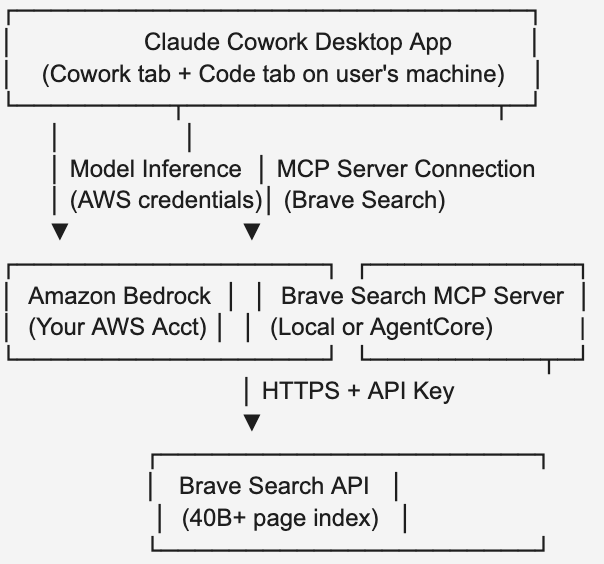
- Model inference routes exclusively through Amazon Bedrock in your configured AWS Regions.
- MCP server connections go to endpoints you approve. The Brave Search API key lives only in the MCP server configuration.
- Optional telemetry (token counts, model ID, and error codes) goes to Anthropic and can be fully disabled.
Claude Cowork works with the AWS services you already use: authentication through IAM, network isolation through Amazon Virtual Private Cloud (Amazon VPC) endpoints, observability through OpenTelemetry export to Amazon CloudWatch, and audit through AWS CloudTrail.
Claude Cowork 3P with Brave Search MCP
This path is for interactive, user-driven workflows. Your teams use the Cowork desktop application to delegate work to Claude, and Claude uses Brave Search when tasks require current web data.
Step 1: Download and configure Claude Cowork on Amazon Bedrock
- Navigate to claude.com/download and choose Download for macOS (or Windows).
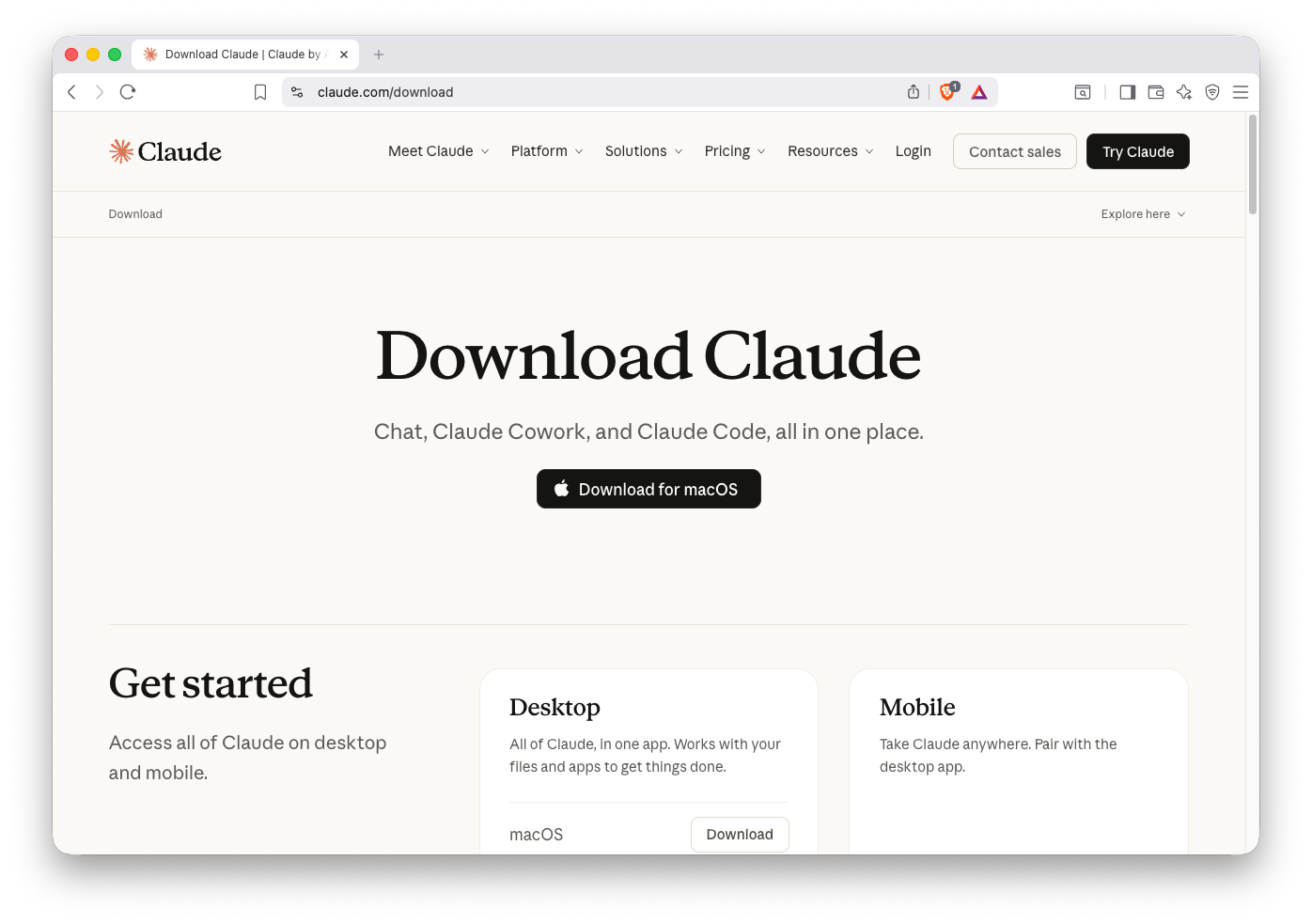
- Enable Developer Mode in Claude Desktop:
- In the top menu bar, choose Help.
- Choose Troubleshooting to expand the submenu.
- Choose Enable Developer Mode.
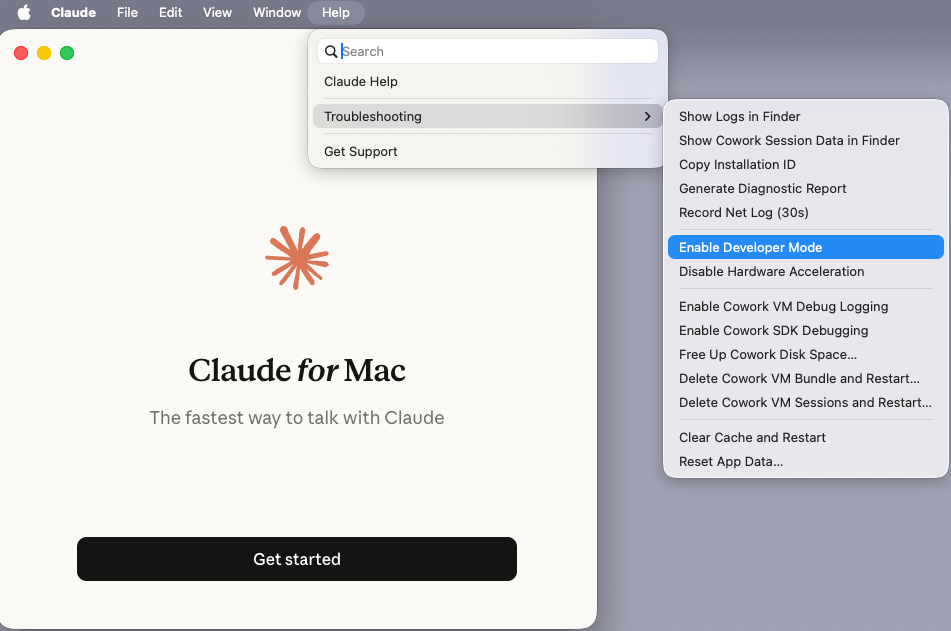
This unlocks the Developer tab in Settings, which contains the Local MCP Servers configuration.
- Configure your Bedrock connection. On the Configure third-party inference page, select Bedrock (AWS) under Connection. Enter your AWS credentials including your AWS region (such as us-west-2) and AWS bearer token. Choose Apply locally to save.
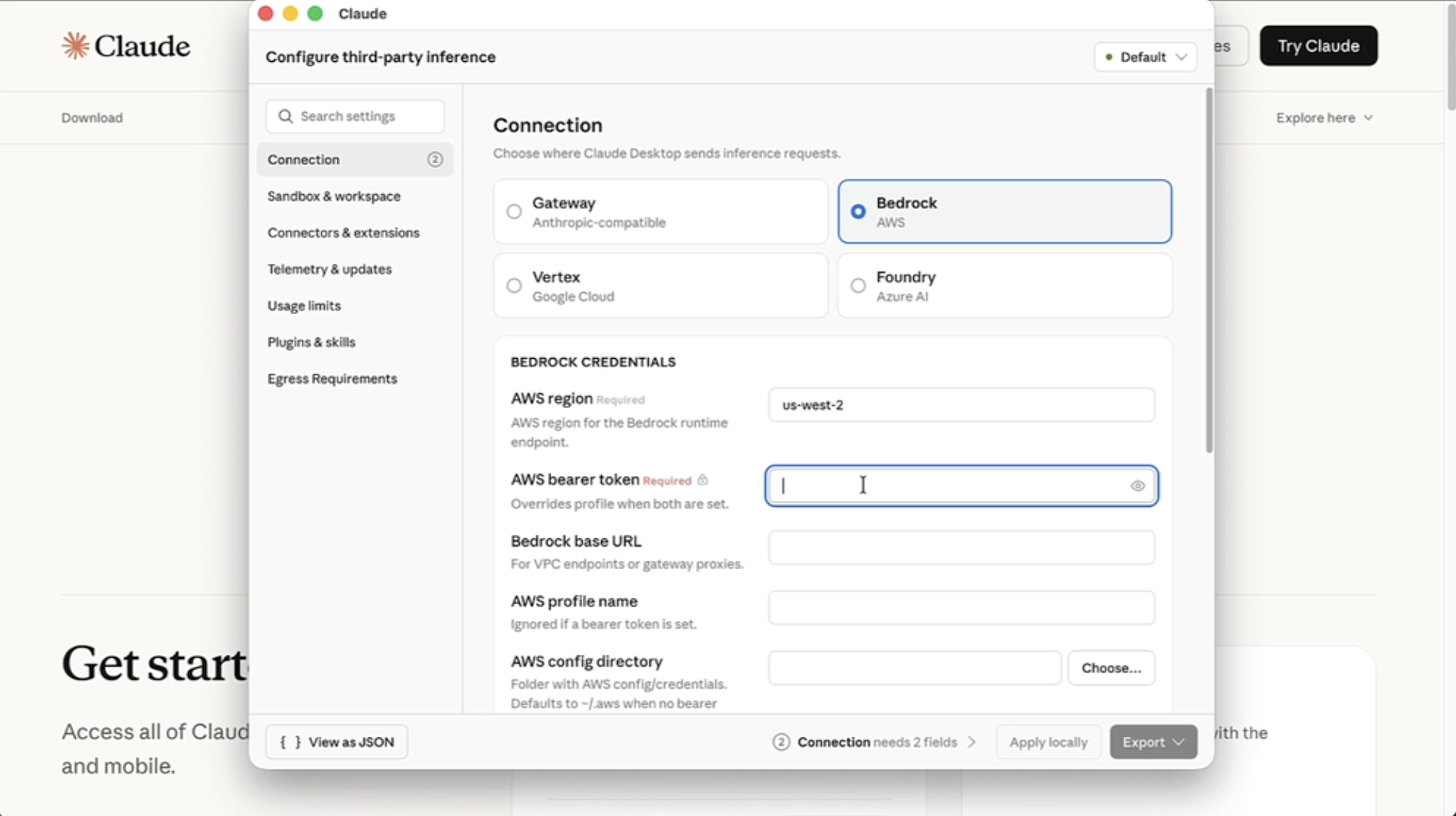
- Launch Claude Desktop. On first launch, you see the authentication prompt: “How do you want to use Claude?” with a note that a local configuration was found on this device. Choose Continue with Bedrock (no Anthropic account needed).
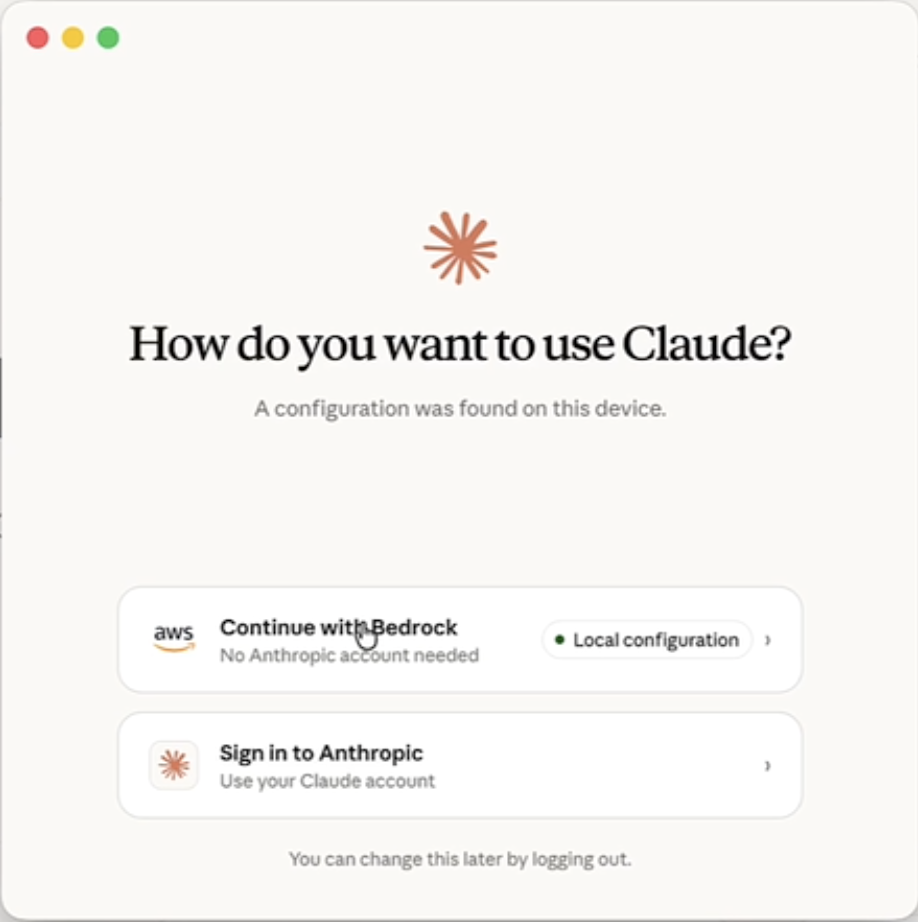
Once configured, Claude Cowork on Amazon Bedrock gives every team a capable AI assistant that handles multi-step work end to end. Users can delegate research across uploaded documents, synthesize conflicting inputs into structured deliverables, process and transform data files, generate reports with sourced citations, and run agentic coding workflows through the Code tab: all under the same Bedrock inference configuration.
Now let’s dive into how we can utilize Brave Search within Claude Cowork + Bedrock.
Step 2: Subscribe to the Brave Search API on AWS Marketplace
- Navigate to the Brave Search MCP Server listing on AWS Marketplace.
- Complete the subscription flow.
- Obtain your Brave Search API key from the Brave Search API page.
Each plan includes five dollars in free monthly credits: couple this with a custom usage limit, and you can ensure your proof of concept runs at no charge to you or your organization.
Step 3: Configure the Brave Search MCP Server
- Navigate to the claude_desktop_config.json file on your machine. On macOS, this is located at:
~/Library/Application Support/Claude-3p/claude_desktop_config.json Right-choose the file and open it with your preferred editor (such as Visual Studio Code).
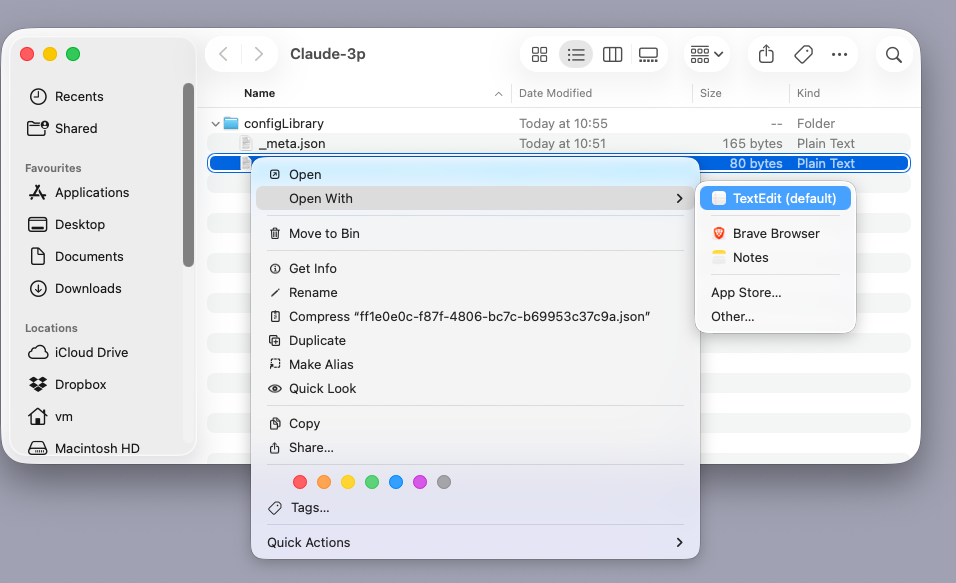
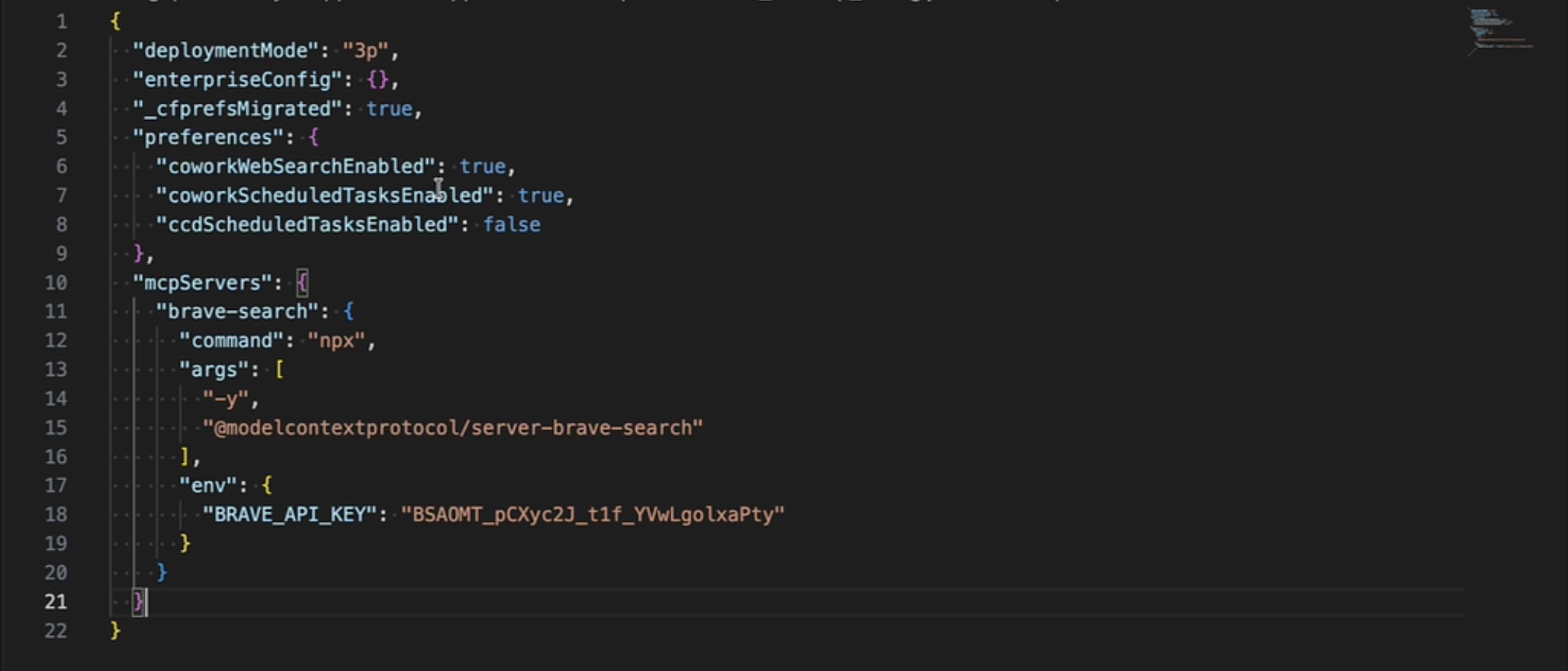
- Add the Brave Search MCP server configuration to the mcpServers object:
{
  "mcpServers": {
	"brave-search": {
  	"command": "npx",
  	"args": ["-y", "@modelcontextprotocol/server-brave-search"],
  	"env": {
    	"BRAVE_API_KEY": "<YOUR_BRAVE_API_KEY>"
  	}
	}
  }
}
- Save the configuration file and relaunch Claude Desktop.
- Navigate to Settings, choose the Developer tab, and confirm the Brave Search MCP server appears in the Local MCP Servers list with a “running” status badge.
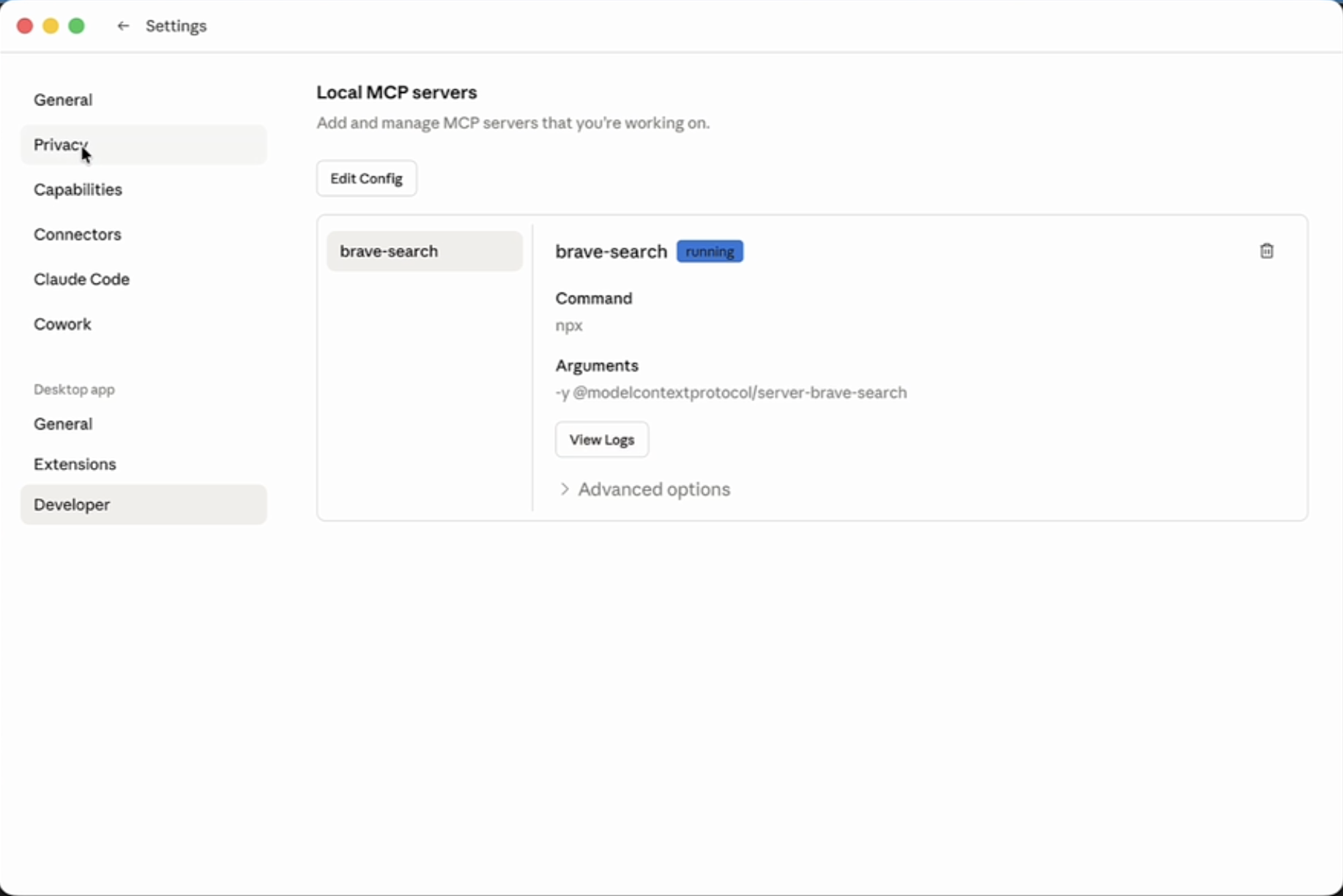
Step 4: Test the integration
Ask Claude about a recent event (e.g. “What are the latest AWS partnership announcements?”). Claude will then:
- Request permission to use the Brave Search tool (you see a permission prompt on first use).
- Run the search against Brave’s live web index.
- Return grounded, sourced results with current information.
Brave Search MCP is now configured within Cowork 3P. Your teams can access real-time search results directly in their workflows.
Additional resources
- Brave Search and AWS hands-on workshop
- Building a Market Research Agent with Brave Search MCP and Amazon Bedrock AgentCore on AWS re:Post
- Sample code repository on GitHub
- Claude Cowork Configuration Reference
- From developer desks to the whole organization: Running Claude Cowork in Amazon Bedrock on the AWS Machine Learning Blog
Pricing and availability
- Claude Cowork on Amazon Bedrock: Consumption-based pricing through your existing AWS agreement. No seat licensing from Anthropic.
- Brave Search API: The Search plan is available at five dollars CPM ($0.005 for each request), with five dollars in free monthly credits. Available on AWS Marketplace.
- Brave Search MCP Server: Available as a container image on AWS Marketplace for deployment on AgentCore, Amazon ECS, Amazon EKS, or locally.
- Availability: Claude Cowork is available on macOS and Windows in all AWS Regions where Claude models are available on Amazon Bedrock.
Conclusion
The Brave Search MCP runtime, deployed locally or on Amazon Bedrock AgentCore, turns the live web into an effective tool for your agentic AI workflows. The MCP layer handles credential storage, request formatting, and API communication. Your agents focus on the work.
What would have required a custom integration, a secrets-management strategy, and significant boilerplate code reduces to a configuration file and a few lines of Python. This is the practical value of MCP on AWS: external APIs become first-class agent tools with the same security model and operational simplicity you already rely on across AWS.
Get started today:
- Download Claude Desktop from the Claude Desktop download page
- Subscribe to the Brave Search MCP Server on AWS Marketplace
- Follow the Claude Cowork Configuration Reference for Amazon Bedrock setup
- Clone the sample-brave-demos repository to build your own agents