
How Google’s anti-scraping move became our problem (and how we solved it in a user-first way)
In the upcoming days, Brave Search result links will no longer lead directly to their destination; they will pass instead through our URL cloaking scheme. From the user’s point of view, nothing changes: you click a result and the page opens, exactly as it always has, while your browser decloaks and navigates to the destination on your behalf.
A cloaking service run by a search engine has historically been a mechanism for finding out where people go after leaving the results page. We would rather continue not knowing. To this end, we developed a privacy-preserving scheme, based on partially oblivious pseudorandom functions, that prevent us from learning which result you clicked on.
Why this service has become necessary
The impetus behind building this cloaking scheme is defense against bots and scrapers, and the occasion is Google’s recent implementation of GOTO, a similar mechanism that routes clicks on search results through google.com/goto before sending the user to the destination page. Scrapers are automated services that collect search results in bulk and resell them, often cheaply, to customers such as chatbots and AI agents that want search data without building their own index. Like many acts of enforcement, Google’s implementation did not so much abolish the scraping trade as relocate it, thus a good part of the scraping once directed at Google now arrives at the door of Brave Search, and adds to the legitimate traffic we already had. But it is definitely not the kind of traffic that we want or can afford to serve.
Scraping Google has become harder after the GOTO release, especially if results need to be fetched in real-time. Consequently, the scrapers have done what any rational enterprise does when its supplier closes shop: they went looking for another one. In this particular case, for a search engine that maintains an independent index rather than reselling someone else’s.
The consequences have had a massive impact for Brave Search: traffic spikes of several thousand requests per second, which consume our servers and our team in roughly equal measure. This traffic also forces our already-stretched bot protection to become more aggressive, and the bill for that falls on real users in the form of slower results and more CAPTCHAs.
We take the open Web seriously, which is precisely why we built the Brave Search API, offering the same results you get on Brave Search1, free for personal and hobby use and paid for commercial use2. Anyone who wants our results may have them through the front door, instead of relying on those who are able to get them climbing through the window.
Why Google moved, and why now
For years, Google regarded the scrapers unofficially reselling its results with a kind of benign neglect, and not without reason. Those scrapers never competed with Google; they competed with Bing, with Brave, and with anyone else trying to build a search business. A steady supply of cheap Google results was a remarkably efficient way of demonetizing the market, removing any economic incentive to build an alternative. Of course the main driver monetizing search engines is via ads. But monetizing through ads is only possible once a critical mass has been reached; in the interim the only alternative path to monetization is selling access to search itself via API, a path that scrapers could leverage by reselling Google results while Google looked the other way. While not necessarily a reliable business plan, it was certainly convenient.
What disturbed this arrangement over the last two years was the arrival and consolidation of a new and very active class of users: chatbots and agents. They query constantly, and in doing so have made serving search results lucrative for search engines like ours; for scrapers reselling Google; and for everything in between (as the sudden profusion of companies selling search, preferably of the “agentic” variety, attests).
This disruption changed the underlying game. Not because of the money (Google is no longer in the search API business), but rather because scrapers have become instrumental to Google’s competitors in the AI space. To demonetize Bing is one thing; to subsidize, by proxy, OpenAI’s ChatGPT, SpaceX Grok, Meta and every other rival competing head-to-head with Google for people’s attention is quite another.
What Brave’s cloaking service means for users
Cloaking result URLs is not without side effects (though these side effects are shared with the GOTO schema introduced by Google). The most noticeable one is that a link copied from the results page is the redirect, not the destination. Redirect URLs might expire, so they should not be trusted as bookmarks or for long-term storage. Another shortcoming is that a redirect can become a vector for phishing attacks, since the attacker could use the reputation of a brave.com/go link to deliver something harmful.
We have taken countermeasures where possible, including the ability to repudiate a redirect, a time-to-life count, and the use of an interstitial page to alert the user. The last side-effect only applies to users who have disabled JavaScript; in those cases, the oblivious scheme cannot run and the only option is to do a conventional redirect where the server (in this case Brave) can see the URL clicked.
What it looks like to use a brave.com/go link: encryption & privacy
With brave.com/go links, every result link will be encrypted, and only readable with the right key. If you hover over a result, you will see a search.brave.com/go/v1#… address; the real destination is the encrypted part at the end, and that destination never travels back to our servers. Each link has its own key, and only Brave holds those keys.
For example, say you search for “hiking boots” and click the third result. Your browser needs the key for link number 3, so it asks Brave Search. But the browser does not simply say “give me the key for link 3”. It first disguises the request with a random number that only it (the browser) knows: whichever link you clicked, what reaches Brave Search looks exactly the same.
Brave Search then applies the secret to the disguised request, and sends the answer back. Your browser removes its random number, and what is left is the key for link 3, which is useless for any other link. The browser decrypts the destination and goes straight to the site; the visit itself never passes through Brave Search.
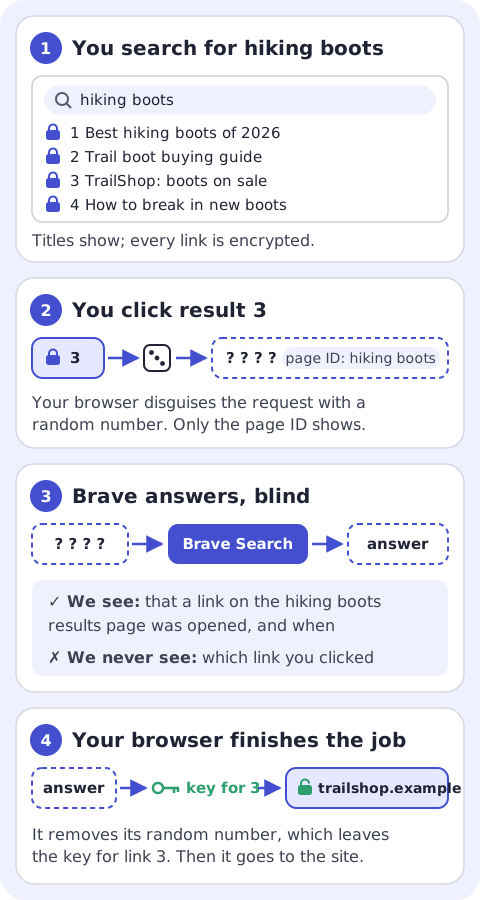
This technique uses something called a partially oblivious pseudorandom function: “oblivious” because we compute the answer without seeing the question, and we only “partially” compute that answer so one part of the request stays readable (i.e. the results page it came from). So Brave Search can know that someone opened a link from the “hiking boots” results page, and when, but never which exact link.
One answer opens one link, and that is where the scrapers’ arithmetic changes. A person opens a link or two from a results page; a scraper wants all of them, on every page, and must now ask for each key, which we can count per page. This means scraping results at scale becomes expensive, and does not get in the way of real humans searching, and does not allow the learning of where exactly people clicked.
Conclusion
Inspired by Dijkstra’s comment that GOTO is to be considered harmful, we have made our privacy preserving implementation of it harmful only to scrapers. Users will get their results as before, and we still won’t know where they go. Anyone who wants our search results at scale is welcome to use the front door.

