
New models available in the Brave Leo AI assistant
Leo is Brave’s browser-native smart AI assistant. It can answer questions, analyze websites and docs, generate new content, and more. All with privacy and performance at heart.
By default, Leo comes with multiple open-source models to choose from, depending on the task. Now, Android users on version 1.86 and above can choose from several new free models including:
- GPT OSS 20B
- Llama 4 Scout, and Llama 4 Maverick
- Qwen 3 VL 30B
Leo Premium users can try the above new models, plus try these additional new models:
- Claude Sonnet and Opus 4.6
- Deepseek v3.1
- GPT OSS 120B
- Mistral Large and Pixtral Large
- Qwen 3 VL 235B and Qwen 3 Coder 480B
To select a Leo model:
- Open Brave, and tap “⋮” to open the menu.
- Tap Leo AI.
- Tap Automatic ⌄ to see all the models available.
If you’re not yet a Leo premium user, visit account.brave.com to get started.
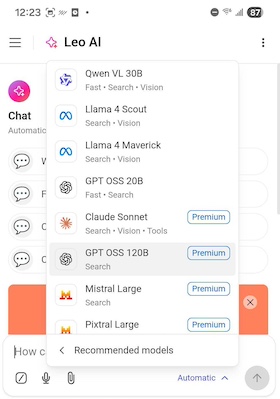 New models on Brave Leo

