Brave blocks… Open-in-app notices

Almost every website has its own mobile app—and they really want you to use it. So when you visit a site like facebook.com or youtube.com in your browser, you’ll probably see an annoying “open-in-app” message.

Why? Mostly so they collect more of your data. Really, the experience can be just as good in your browser—and if you visit in the Brave browser, you’re more protected, too.

Brave blocks ads, trackers, and cookies on sites like Reddit and YouTube. Now, Brave can also block those annoying “open-in-app” notices, too.

See the difference?
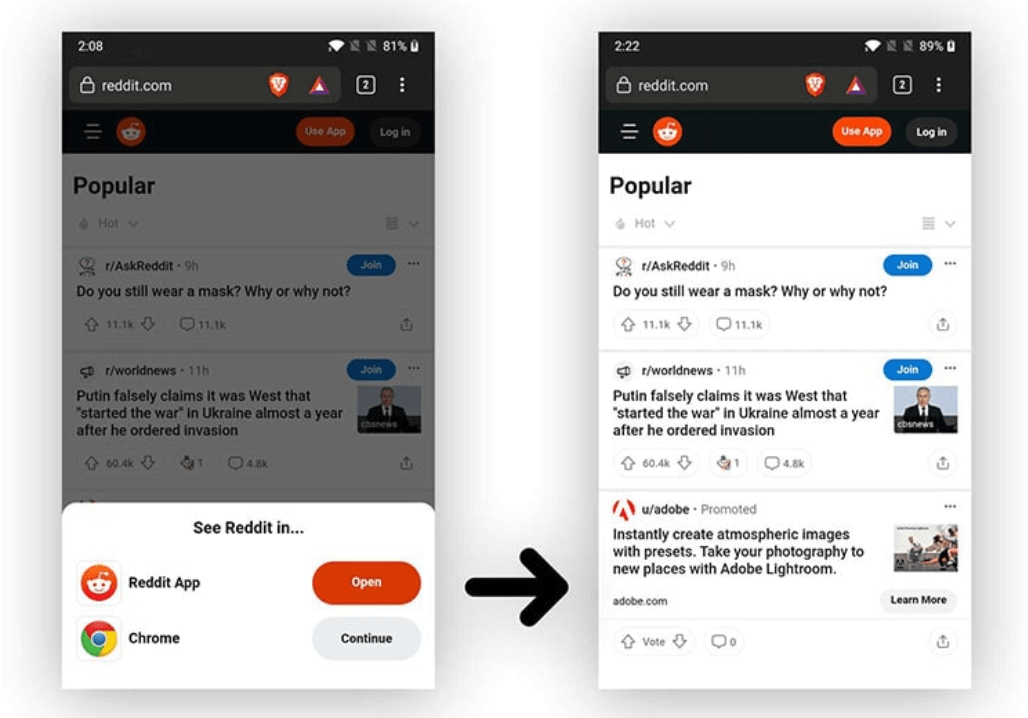
screenshot of website when using Brave Browser

Open-in-app blocking is just one more way Brave is making the Web better—easier, faster, less frustrating, and more private.

Just download Brave, and enjoy built-in blocking of the Web’s biggest annoyances.

Ready for a better Internet?

Brave’s easy-to-use browser blocks ads by default, making the Web faster, safer, and less cluttered for people all over the world.

Brave logo

Almost there…

Please continue the installation of Brave in the .

Google Play app .

You’re just 60 seconds away from the best privacy online

  1. Download Brave
  2. Run the installer
  3. Import settings
  1. step 1
    Download Brave

    Open the installer from Chrome's downloads (it should be in the upper right corner of this window).

  2. step 2
    Run the installer

    If you're prompted to, click “Yes” in the User Access Control dialog.

  3. step 3
    Import settings

    Wait for the installation to finish, then import your browser settings from Chrome.

If your download didn’t start automatically, click .

Need help?