Brave saves… Time

At some point, everybody deals with slow Internet. Thing is, the problem usually isn’t your connection—it’s the websites you’re viewing. Specifically, that they’re full of visible junk (like annoying ads and pop-ups) and invisible junk (like trackers).

But visiting a website in Brave makes a huge difference:
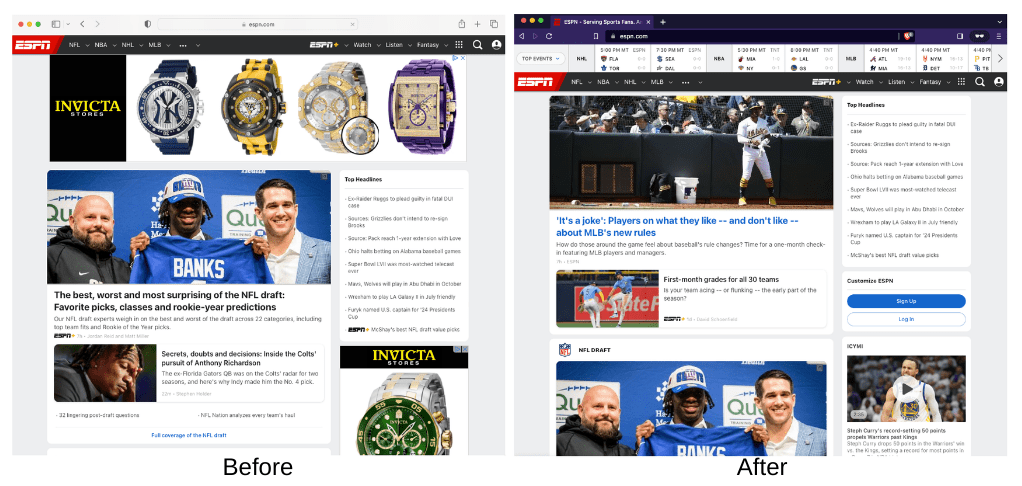
screenshot of website when not using Brave Browser

The Brave browser blocks that unwanted stuff from loading—including blocking the pesky ads that drain your battery and data. Aside from a cleaner view of the Web, Brave also lets you browse at blazing-fast speeds. Because with less junk to load, pages just load faster.

Download Brave, open the app, and use it the same way you would any other Web browser—it works right out of the box.

Brave logo

Almost there…

Please continue the installation of Brave in the .

Please continue the installation of Brave in the .

You’re just 60 seconds away from the best privacy online

  1. Download Brave
  2. Run the installer
  3. Import settings
  1. step 1
    Download Brave

    Open the installer from Chrome's downloads (it should be in the upper right corner of this window).

  2. step 2
    Run the installer

    If you're prompted to, click “Yes” in the User Access Control dialog.

  3. step 3
    Import settings

    Wait for the installation to finish, then import your browser settings from Chrome.

If your download didn’t start automatically, click .

Need help?